


WhatsApp is perhaps the most popular app in India, but there’s one useful feature that’s a little hard to find – the ability to make notes to yourself. Other messaging apps like Signal come with this feature, which is helpful for making lists, saving links, and more. WhatsApp is used to share text messages, photos, videos, files, documents, stickers, and even GIFs. There are several features that WhatsApp has introduced over the years, and this includes the ability to archive chats, mute groups, and even star important messages. Being able to add notes to self takes the app one step further and makes it even more useful.
This feature is very easy to use, but is not very well known among WhatsApp users. Here’s a step-by-step guide on how to chat with yourself on WhatsApp for taking notes, making to-do lists, and more.
How to Chat With Yourself on WhatsApp
Chatting with yourself on WhatsApp is useful for multiple reasons. It enables you to save links and videos of recipes, how tos, or DIYs that you may want to go through later. As mentioned, this feature also lets you make shopping and to-do lists and share files across devices easily. Follow these steps to begin chatting with yourself on WhatsApp.
-
Open any browser (Google Chrome, Firefox) on your phone or PC.
-
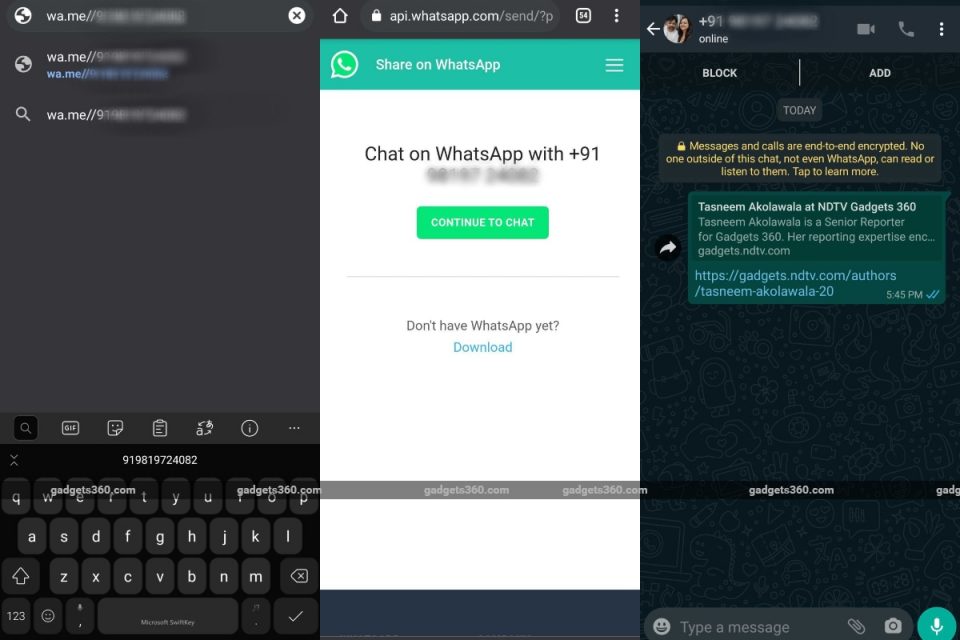
Type wa.me// in the address bar, followed by your phone number. Make sure you add your country code before enter your mobile number. For Indian users, it will be wa.me//91xxxxxxxxxx.
-
A window prompt will ask you to open WhatsApp. If you are on the phone, your WhatsApp will open up with your phone number displayed on top, alongside your profile picture. You can then begin chatting with yourself, add notes, or save photos and videos.
-
If you are on PC, then a new window will open up with a button that reads, “Continue to Chat”.
-
Click on that option and either WhatsApp Web or the WhatsApp desktop app will open up with your own chat shown. You can then begin chatting with yourself. This chat, with all the links and texts, will then show up on your phone as well so you can access all the information across devices.
Does WhatsApp’s new privacy policy spell the end for your privacy? We discussed this on Orbital, our weekly technology podcast, which you can subscribe to via Apple Podcasts, Google Podcasts, or RSS, download the episode, or just hit the play button below.